





What TMF teams are up against
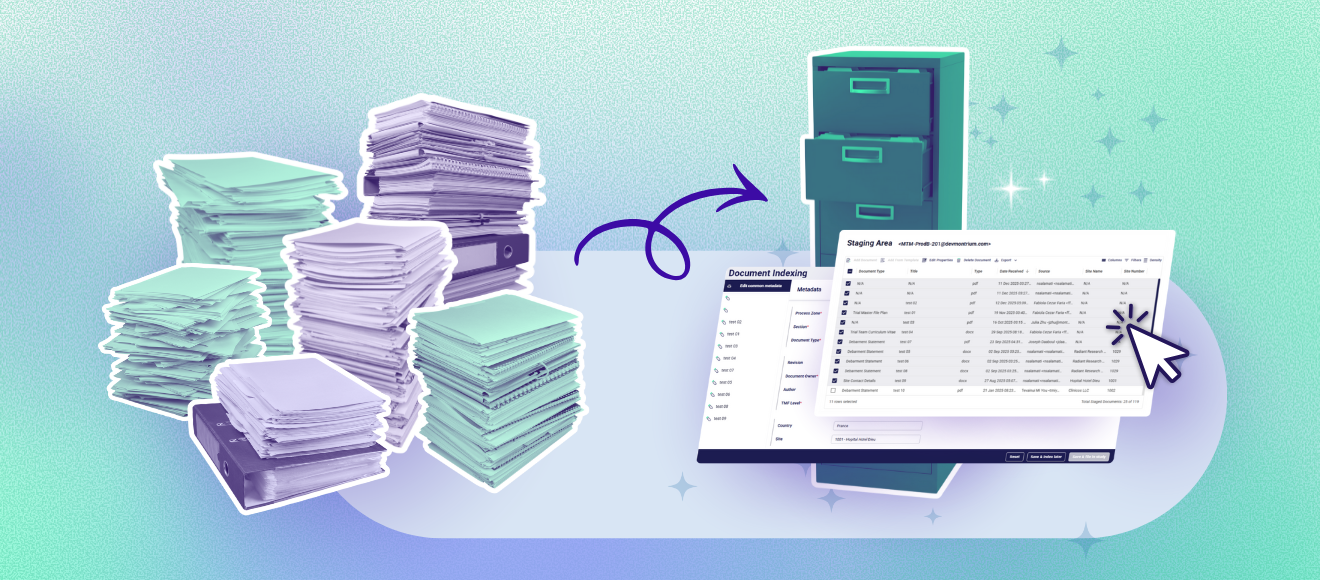
Let's paint the picture of what a typical day looks like for TMF professionals. You arrive at your desk. Your inbox is full. Your staging area has 50, 100, maybe 200 documents waiting to be processed. Some came from Site 1001 in France, others are from your CRO's monitoring team. A few are internal pharmacovigilance reports.
Each document needs attention:
- Identify what it is (protocol deviation? Informed consent form? IRB correspondence?)
- Apply the correct metadata (site number, country, document type, artifact number)
- Verify the format (Does it need to be converted to PDF/A?)
- File it in the right location (Which zone? Which artifact? Which subfolder?)
Now multiply that process by every single document.
The result? TMF teams spend hours, or sometimes entire days, just indexing documents and filing them into the system. It's manual. It's repetitive. And frankly, it's not the best use of highly skilled quality professionals.
What if you could cut your indexing time in half?
That's the promise of Montrium eTMF Connect’s Batch Indexing feature. A fan favourite of our clients.
45% of the documents in Montrium’s eTMF are filed through batch indexing form. This feature is one of the most frequently used features in the system.
Instead of opening each document individually, applying metadata one by one, and filing them separately, you can process entire batches of documents in just a few clicks.
- Select your documents.
- Apply common metadata once.
- Make individual adjustments as needed.
- Hit "Save & file in study."
Done! ✅
The system reads the metadata you've applied and automatically files each document in its correct location in the TMF. What used to take hours now takes minutes.
This isn't about cutting corners. It's about working smarter.
You're still reviewing the documents. You're still applying the right metadata. You're still ensuring quality. You're just not wasting time on repetitive manual filing that a system can handle automatically.
%20(1200%20x%20600%20px)%20(5).png?width=892&height=297&name=CTA%20-%20Blog%20(1200%20x%20400%20px)%20(1200%20x%20600%20px)%20(5).png)
How Batch Indexing actually works
Let's walk through what this looks like in practice.
Step 1: Documents arrive in your staging area
Your study staging area acts as a holding zone for incoming documents.
Maybe they were emailed directly into the system (where attachments are automatically stripped and placed in staging). Maybe they were uploaded from a shared drive. Maybe they came from your CRO's document portal.
However they arrived, they're now sitting in your staging area, waiting to be indexed.
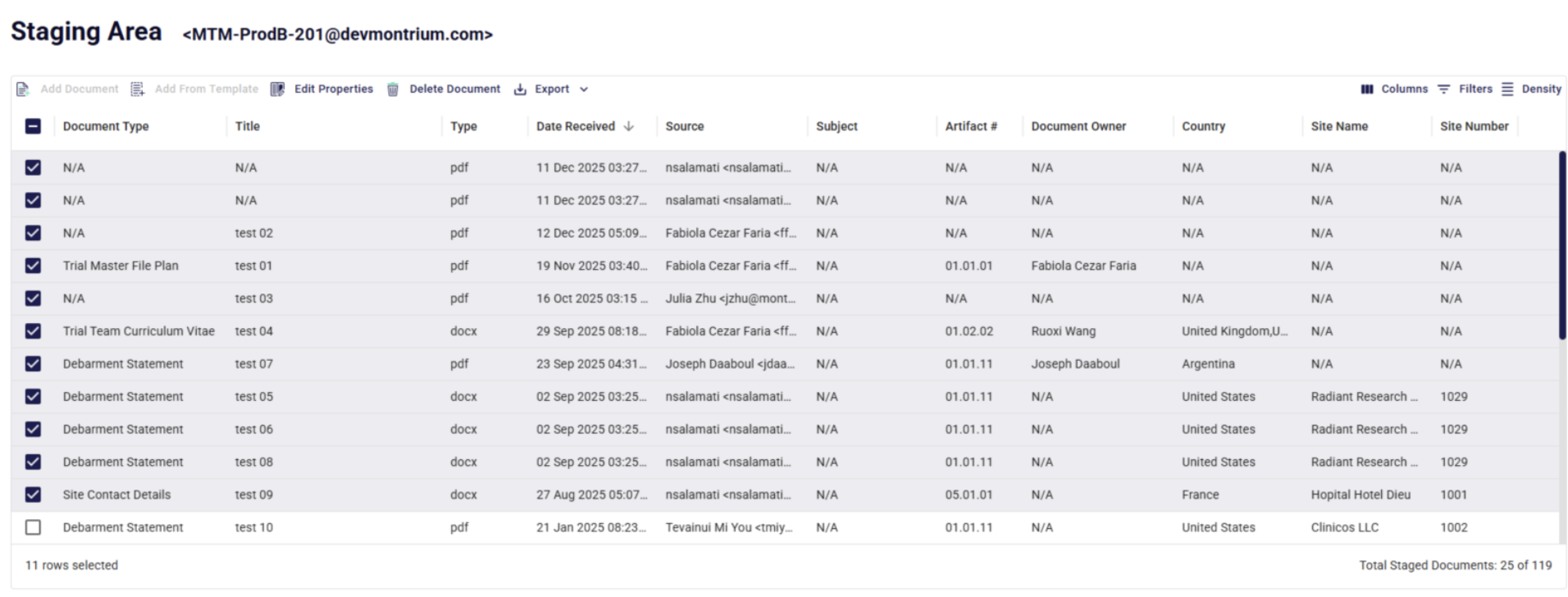
Let's say you have 50 documents from a single site visit—informed consents, adverse event reports, protocol deviations, monitoring visit reports—all mixed together and waiting for you.
Step 2: Select and open Batch Indexing
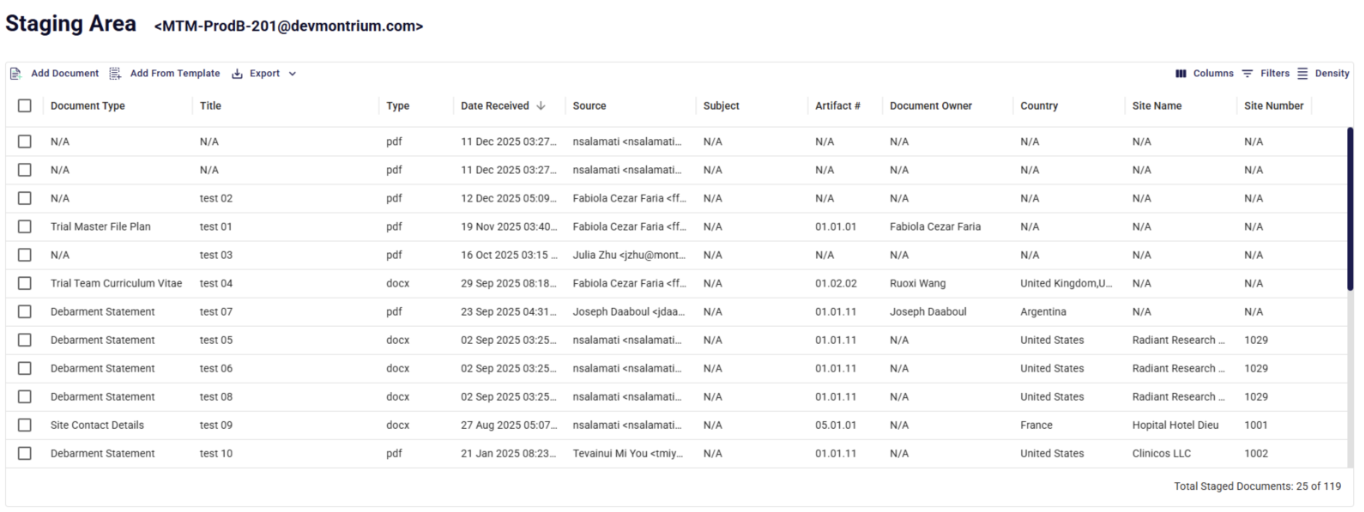
Instead of opening documents one at a time, you simply select all the documents you want to process together.
One click: "Edit Properties."
This opens the batch indexing interface, where you can see all your selected documents and start applying metadata.
Step 3: Apply common metadata
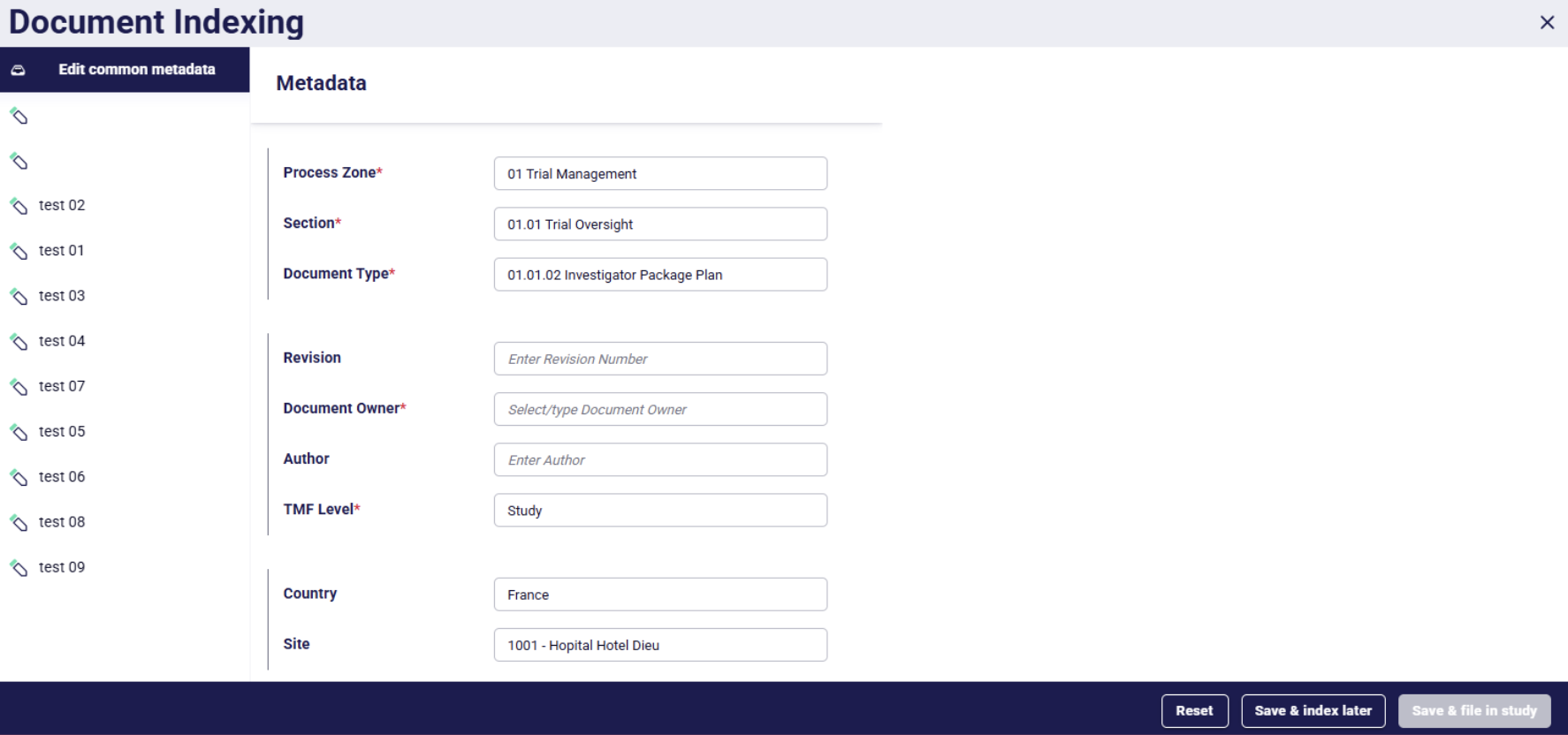
Here's where the magic happens. Most documents in a batch share common metadata. If these 50 documents all came from Site Hopital Hotel Dieu in France, you can apply that site and country information to all of them at once.
Just select the fields:
- Country: France
- Site: 1001 - Hopital Hotel Dieu
Apply once. All 50 documents now have that metadata. No need to type "France" fifty times. No need to select Site 1001 - Hopital Hotel Dieu from a dropdown over and over.
Step 4: Make document-specific adjustments
Of course, not every document is identical.
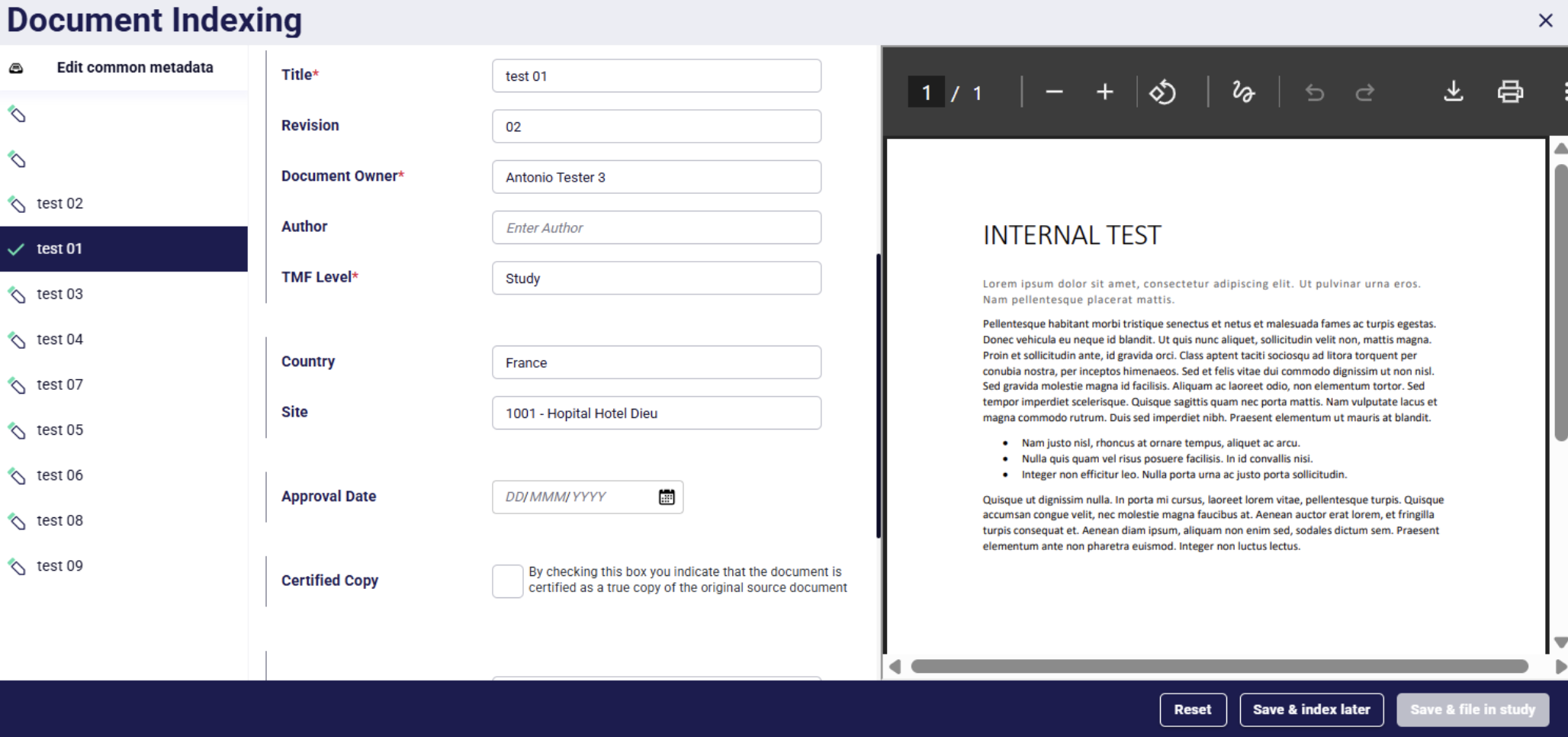
Your informed consent forms need different artifact codes than your monitoring reports. Your IRB correspondence might have different retention requirements than your site qualification documents. That's fine. You can move through the batch document by document, making individual adjustments where needed:
- Set the artifact type for each document
- Adjust, revision, numbers or dates
- Add specific notes or references
You're in full control. The system just handles the repetitive parts.
Step 5: File or index later
Once your metadata is applied, you have options:
- Not quite done for the day? Hit "Save & index Later." Your metadata is preserved, and you can come back to finish indexing when you're ready.
- Ready to file? Hit "File to study." The system reads all the metadata you've applied and automatically files each document in its correct TMF location—proper zone, proper artifact, proper structure.
Just like that, 50 documents are indexed, filed, and ready for inspection.
Want to learn more about Montrium's product updates? Check out our latest feature announcements.
Pro tips from Montrium's customer success team
1 Start small: Begin with 20-30 documents until you're comfortable.
2 Group intelligently: Batch documents by site or document type for faster processing.
The future of TMF management
Batch indexing is just one example of how technology can elevate TMF management from administrative burden to strategic quality function. As the industry continues to evolve, we're seeing more automation, more intelligence built into TMF systems, and more tools that let quality professionals focus on what they do best: ensuring compliance and inspection readiness.
The goal isn't to replace TMF professionals. It's to empower them.
Give them tools that handle the repetitive work. Free them to focus on judgment, quality review, and strategic oversight. Let them be the experts they were trained to be.
Batch indexing is a step in that direction. It takes the tedious, time-consuming work of manual indexing and turns it into a quick, consistent, quality-driven process.
Your team still does the important work. The system just handles the heavy lifting.
Ready to see it in action?
If your TMF team is spending more time indexing than inspecting, more time filing than reviewing, it's time to explore batch indexing. See how study staging areas with batch indexing can transform your workflow, freeing your team to focus on quality, consistency, and inspection readiness.
At the end of the day, a well-managed TMF isn't just about getting documents into a system. It's about building a compliant, audit-ready foundation that stands up to regulatory scrutiny.
And that requires quality professionals focused on quality work, not buried in busy work.
%20(1200%20x%20600%20px)%20(3).png?width=1200&height=400&name=CTA%20-%20Blog%20(1200%20x%20400%20px)%20(1200%20x%20600%20px)%20(3).png)


-2.png)
%20(1).jpg)